


SBE Events
4.822.00 Reviews
App Specs
- Version
- 39.4
- Updated On
- License
- Free
- Downloads
- 10,000+
- Developer
- The Show Producers
- Categories
- Events
- Platform
- Android
Screenshots
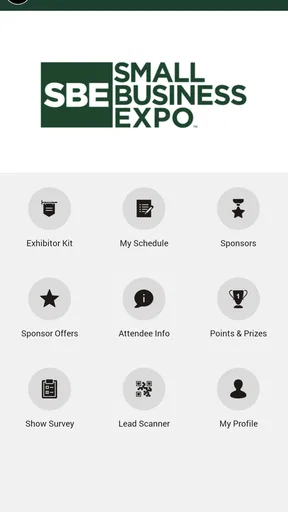
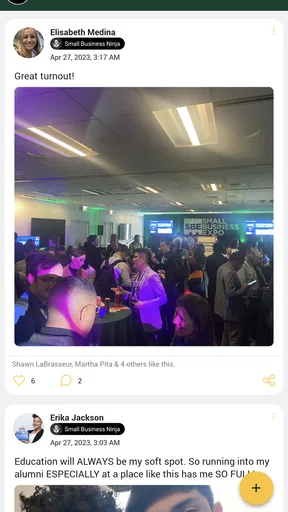
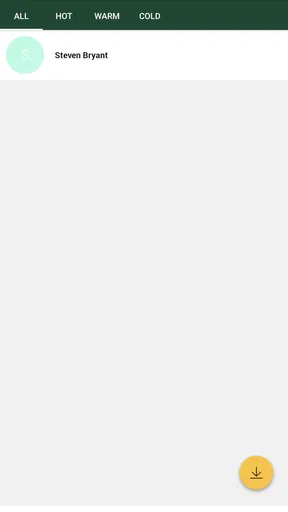
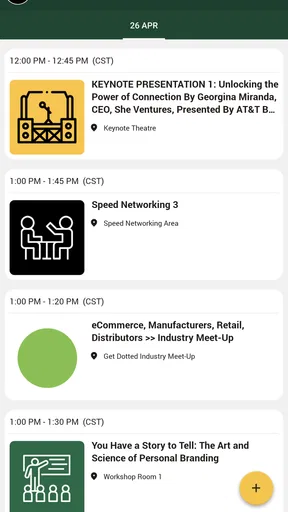
 Analysis by AppCompare
My first impression of SBE Events is that it needs to be judged by the setting it is made for: the events it supports. It is an event companion from The Show Producers, not a universal planner I would expect to run every birthday, work meeting, and community fundraiser. That distinction matters. The app’s central promise is to help attendees keep up with event details and connect around them, so its value depends less on how many planning tools it offers and more on whether it makes a particular event easier to follow.
That focus can be a real advantage when I am attending an event and want its agenda and attendee information in one place instead of searching through scattered messages. It also sets a boundary: if I need to build a guest list, assign jobs, or track a budget for an event I am organizing myself, I would look for a dedicated planning tool instead. I like the idea of an app with a defined role, as long as I know what that role is before I rely on it.
Useful when the event itself is the center of the experience
A practical way to use it is to open the event information before arriving, check what is scheduled, and return to the app when I need to orient myself during the day. That sounds simple, but it can save time at a busy event: I can check the agenda rather than keep switching between an email, a web page, and a note I made earlier. The app is most helpful when the organizers keep the event details current and attendees have a reason to consult them.
It can also help with the social side of attending. If I want to connect with other attendees, having that purpose tied to the event is more useful than relying only on a general social network, where relevant people and conversations can be hard to find. I would still treat it as a companion rather than a guarantee of meaningful networking; the app can provide a place to connect, but it cannot make people respond or ensure every attendee participates.
A focused companion, not an all-purpose planner
That distinction is where I would set expectations. I would not use it as a replacement for a broad calendar, shared spreadsheet, or complete event-management system unless the event itself clearly supports those needs. A calendar is better for comparing several commitments across the week, while a spreadsheet can be easier for coordinating detailed logistics with a small organizing team. SBE Events makes more sense when the event’s agenda and attendee connections are the main things I need to follow.
For someone deciding whether to install it, the key question is whether they are attending an event associated with the app. If so, it may give them a more direct route to the information and people they need. If they are simply looking for a general-purpose organizer, the narrow focus may feel limiting rather than convenient. I would make that decision before moving personal planning into any event-specific app.
Good value, with a clear dependency
The app is free, which makes it easy to try when an event points attendees toward it. It has a 4.8 average from around 250 ratings, and more than 10,000 installs; I see those figures as signs that people have used it, not proof that it will suit every event or every attendee. Its Everyone age rating also makes it broadly accessible. The current version is 38.4, and it was released in 2021, so it is an established event app rather than a brand-new experiment.
Worth Reading Before You Choose

EA SPORTS FC Mobile 26 Is a Bigger Football Game, but It Takes Time

Flipboard Shows What News Apps Must Do Beyond the Feed

Switching to Android Auto Means Rethinking Your Driving Routine

Google Calendar Makes a Crowded Week Easier to Manage

Ludo King Makes the Most of the Minutes Between Plans

Baby Panda World Brings Quick Play to Modern Phones, but Its Game Library Feels Busy
The main trade-off is that an attendee app is only as useful as the event information and participation behind it. If the agenda is not the information I need, or the people I hope to meet are not active there, the app may add another place to check without solving much. I would keep that in mind and avoid assuming it replaces event emails or the organizer’s other channels. For someone who needs a simple event-specific reference point, though, that trade-off may be worthwhile.
Ever stumbled upon an app that just makes organizing events feel like a breeze? Well, let me introduce you to SBE Events. It's like having a personal assistant in your pocket, ready to help you coordinate everything from small gatherings to large-scale conferences. I downloaded it the other day, and I’ve got to say, it’s been quite the game-changer.
The First Impressions
Once you open SBE Events, you’re greeted with a clean, intuitive interface. Seriously, no clutter or unnecessary buttons—just a straightforward layout that even your tech-challenged aunt could navigate. I appreciate how the dashboard gives you a quick overview of your upcoming events, tasks, and reminders. It’s like having your whole schedule laid out in front of you, and trust me, it’s a lifesaver.
Setting up an event is as simple as pie. You just hit the “Create Event” button, and boom, you’re on your way. The app guides you step-by-step, asking for the event name, date, time, and location. You can even add a description and upload photos or documents relevant to the event. It’s comprehensive without being overwhelming, which is a big win in my books.
Diving into Features
Now, let’s talk features because SBE Events has a few tricks up its sleeve. One of the standout features is the guest list management. You can import contacts directly from your phone or manually add them. Once they’re in, sending invites is just a tap away. Plus, you get real-time updates on RSVPs, so you always know who’s coming and who’s not.
Another cool feature is the task management tool. You can assign tasks to yourself or others, set deadlines, and even mark them as complete. It’s perfect for keeping track of those little details that can make or break an event. I can’t count how many times I’ve forgotten to order catering or arrange seating, but with this app, those days are behind me.
Speaking of catering, there’s a nifty budget tracker built into the app. You can set your budget, track expenses, and make adjustments as needed. It’s a great way to ensure you’re not going overboard, and it keeps everything transparent if you’re working with a team.
User Experience and Performance
One of the things I love about SBE Events is its performance. The app runs smoothly, with no lag or crashes in sight. That’s a big deal for an app that handles so much information. Plus, it’s available on both Android and iOS, so no matter what device you’re using, you’re covered.
The developers have clearly put a lot of thought into the user experience. There’s a helpful FAQ section and responsive customer support if you ever run into issues. But honestly, the app is so user-friendly that I doubt you’ll need much help.
The Final Verdict
So, what’s the final word on SBE Events? It’s a fantastic tool for anyone who needs to organize events, whether you’re a seasoned planner or just someone trying to set up a family reunion without losing your mind. It’s packed with features that make planning a breeze, all while maintaining a simplicity that’s rare in such a comprehensive app.
If you’re tired of juggling spreadsheets, emails, and sticky notes, give SBE Events a try. It might just become your new best friend in the world of event planning. And hey, who doesn’t love a little extra help?
Making it useful on a real event day
For a realistic example, imagine I have a full day at a conference and the schedule has several sessions I want to catch. I would check the agenda before leaving, pick the sessions that matter to me, and use the app as a quick reference between them. That small bit of preparation is more useful than trying to read everything while standing in a crowded hallway. I would also keep the event’s essential details somewhere I can reach them if my phone battery runs low; an app should make the day easier, not become the only way I can remember where I need to be.
There is a useful habit here: look at the agenda once before the event, then revisit it when plans change, rather than repeatedly browsing without a specific question. If I am attending with a colleague, we can each use the schedule to coordinate a quick meetup or decide which sessions to attend separately. The app’s attendee-connection angle may help us identify people to speak with, but I would still make a simple introduction in person instead of expecting an app interaction to do all the work.
What to check before relying on it
Before treating any event app as my main source of information, I would confirm that the event I am attending is actually represented in it and that the details I care about are available. I would then compare the agenda with the event’s messages or official instructions, especially before making a trip across town or choosing between sessions. This is not busywork: events can change, and keeping a second route to essential information is a sensible backup.
People often want to know whether an event app will help them plan their whole trip. I would not assume so. An agenda and attendee connections can support the event itself, but travel arrangements, accommodation, and personal calendar planning are different jobs. I would use the tools designed for those tasks alongside this app rather than trying to make one event companion cover everything.
Another practical question is whether I need to use it if I prefer not to network. I would still consider it if the agenda is useful for my visit; connecting with other attendees is an option, not the only reason to open an event app. On the other hand, if I already have a reliable schedule and do not need the app’s event-specific information or connections, installing it may not change my day. That is a fair reason to skip it.
Who will get the most from it
I would recommend it most to people attending events whose organizers use it as a central companion: conference-goers who want a handy schedule, attendees who like meeting others in the same event community, and anyone who would rather check one event-focused place than search through old messages. It may be especially handy for someone going to an event for the first time, because having the agenda close at hand can make an unfamiliar day feel easier to navigate.
I would be more cautious if I were an independent event organizer looking for a complete planning workspace. The original text describes tools such as creating events, guest management, task assignment, and budget tracking, but those are not the core attendee-facing role that makes this app distinctive. For complex logistics or collaborative production, I would first make sure the exact functions I need are available for my use case. A dedicated event-planning service or a shared spreadsheet may be the better fit when control over detailed operations matters more than attendee access.
In the end, I see the strongest case for SBE Events as a focused bridge between an event’s schedule and the people attending it. That can be genuinely helpful when the event makes active use of the app, and less compelling when I am looking for a universal planner or when the event information I need lives elsewhere. I would install it for a relevant event, use it to orient myself and make connections at my own pace, and keep other planning tools for the jobs they handle better. That is a practical, modest promise—and the right audience is likely to appreciate it.
Pros
- User-friendly interface for easy navigation.
- Customizable event notifications.
- Comprehensive event details provided.
- Offline access to saved events.
- Seamless integration with calendars.
Cons
- Limited event categories available.
- Occasional sync issues with calendar.
- No dark mode option available.
- Requires regular updates for stability.
- Limited customization for notifications.
FAQs for SBE Events
What is SBE Events, and what can I use it for?
SBE Events is a versatile app designed to streamline event management. It's perfect for organizing conferences, meetings, and social gatherings. Users can manage RSVPs, send out invitations, and keep track of event details all in one place. It's a comprehensive solution for both personal and professional use.
Is SBE Events available on both Android and iOS platforms?
Yes, SBE Events is available for download on both Android and iOS devices. This ensures that users can access their event management tools regardless of their preferred platform, providing flexibility and convenience for all users looking to coordinate events efficiently.
What features does SBE Events offer to enhance event planning?
SBE Events offers a range of features including RSVP tracking, automated reminders, customizable event pages, and integration with calendar apps. It also provides analytics tools to measure event success and offers a user-friendly interface that simplifies the process of organizing any event, large or small.
Are there any additional costs or in-app purchases with SBE Events?
While SBE Events offers a free version with basic functionalities, there may be additional costs for premium features. These can include advanced analytics, additional customization options, and support services. It's advisable to review the pricing details within the app to understand any potential expenses.
How secure is my data with SBE Events?
SBE Events prioritizes user data security with robust encryption and privacy protocols. The app ensures that personal and event information is protected from unauthorized access. Users can manage their privacy settings to control who can view event details, providing peace of mind when planning and managing events.


